Extended SA Lab
Introduction
For this lab, I’ve decided to go ahead and use VMWare to virtualize this environment. I’m using Vmware Workstation 5.5, using two machines, Giygas (the Windows 2003 Enterprise Server machine), and Ness (the Gentoo Linux machine), in a team called Magicant. This will also be the name of the AD domain that both will be joined to.
Installation
Windows 2003 Enterprise Server
Stuck in the disk, booted the machine for the fist time, and created one large partiton. I informed this machine that it would be part of a workgroup called Magicant, at least temporarily.
Software was procured via the MSDNAA, so activation was just fine.
The machine has booted, and I am able to log in as the Administrator account. Installed VMWare tools and snapshotted.
As this is going to be a server machine, the ip really ought to be static. I’ve set this to 10.22.1.50 in the networking control panel.
I’ve changed the Administrator account name to jpork.
Ran Windows Update and scheduled automatic updates to run every night at 3am. Lots and lots of restarts here.
I added the Active Directory role to this machine. The DNS name of this domain is “magicant.rc”, and the machine has been set to be a DNS server to facilitate this naming.
As advised by this link, I’ve added Certificate services to the machine, allowing giygas to manage a PKI for me. I’ve set it to be an enterprise root CA with default settings, and chose “giygas” as the common name of the CA.
Gentoo Linux
I’ve done a few gentoo installs in the past, using the liveCD and the manual installation process (unpacking the stage, editing the config files, and setting the ebuild system to work). This time, I decided to use the new graphical installer- it’s intended to be a time-saver against the manual install, while giving you the same control. The installer more or less walks you though the same steps as in the gentoo quick install guide (http://www.gentoo.org/doc/en/gentoo-x86-quickinstall.xml).
Unfortunately, it doesn’t work, and crashed midway through the install, at least with the hardened-sources kernel set. So much for that.
I booted with the minimal cdset, and manually created partitions using cfdisk. I’m simply using one large partition for /, formatted with ext3 using the dir_index option. ext3 was chosen as it is the best tested option, is quite speedy with the dir_index option, and supports all the necessary features (reiserfs, probably the next-most used Linux filesystem, does not have reliable security label/ACL support. we want this.)
I then downloaded a stage3 tarball optimized for i686, and unpacked it into the target install directory.
The machine hosting VMware in my case is an Athlon64. Despite this, I kept things generic and am optimizing only for i686.
The plan for this machine is as follows:
apache
AFS
qmail
mod_php
sftp
mysql
mssql (interface with)
bind
mailman (mod_python)
As such, the following USE flags were selected:
apache2 (selects version 2 of apache)
hardened (switch to build “hardened” toolchain)
pic (enables position-independent code in the compiler)
qmail (my MTA of choice, despite djb)
php (needed to fulfill a later requirement)
mpm-worker (an efficient process manager for apache2)
acl (access contol list support in the filesystem)
kerberos (needed for authentication)
ldap (needed for ad integration)
pam (pluggable authentication modules. allows different auth methods to be used.)
readline (everybody wants this.)
crypt (adds encryption support in many packages)
gdbm (GNU database libraries)
samba (support for samba, global flag)
ssl (ssl support, global flag)
tcpd (tcp wrapper support, not sure if this is necessary)
cups (for printing. we maybe don’t need this.)
python (gentoo relies on python for its build system. also, we will be using mailman, a python listproc manager)
perl (perl is great.)
xml2 (xml is great.)
mysql (as we’ll be using this later)
mysqli (support stored procedures in mysql)
berkdb (berkeley DB for mysql and sldapd)
userlocales (build only the locales we need)
unicode (the right thing to do)
The exclusive flags are as follows:
-X (we don’t need X, this is a server)
-hardenedphp (breaks a lot of stuff)
-doc (needed to avoid installation of X)
I’ve also added the following lines to package.use at the recommendation of the gentoo-wiki.com article on how to integrate Linux with Active Directory:
net-fs/samba acl ldap kerberos pam winbind
net-nds/openldap sasl samba kerberos
dev-libs/cyrus-sasl authdaemond -java kerberos pam ldap
I’ve also selected the following packages to install (those that go directly into my world file)
vixie-cron (cron daemon)
syslog-ng (syslog)
app-admin/sudo (i like sudo)
slocate
netcat (great for testing)
openntpd (for clock sync)
samba (for file and print sharing with windows)
openldap (for AD integration)
cyrus-sasl (for ldap query encryption/etc)
mit-krb5 (kerberos)
pam (pluggable authentication module base)
pam_krb5 (PAM interface to kerberos)
nss_ldap (name-service switch utils that allow one to use ldap for usernames, groups, etc)
smbldap-tools
portmap (for nfs)
nfs-utils (for nfs shares)
apache (web server)
bind (a nameserver)
mysql (mysql)
mail-mta/qmail (my MTA of choice, despite djb)
vim (my editor of choice)
screen (oh how i love screen.)
terminus-font (a good unicode console font)
gentoolkit (management tools for gentoo)
bootsplash (no reason, it’s just pretty)
bootsplash-themes (same)
dev-lang/php (php5)
gpm (for mouse on console)
strace (important for debugging)
links (text-mode web browser)
host (from bind9)
To take care of this goodness, the following command was issued:
Much compiling and gnashing of teeth ensued afterwards.
I’ve edited rc.conf and added UNICODE=“yes” to enable console unicode support. I’ve also edited /etc/conf.d/net to make sure that this machine always has the ip 10.22.1.51 and uses our windows server for DNS, so we don’t have any trouble with Kerberos et. al.
kernel
I also decided to use the hardened kernel sources, as this would be a fairly important machine, being the PDC for a domain. hardened-sources enable a few things that help with security, such as binary relocation and stack-smashing protection, making buffer overflow exploits much more difficult. It’s similar to W^H (XXX fix me XXX) in OpenBSD and the ProPolice initiative in GCC. It may make a few things more difficult down the line, as certian pieces of code depend on text-segment relocation, like X11, but it is most likely a good exercise. Because of this, the Use flags hardened and pic were added.
I’ve compiled the kernel without loadable module support. There’s no need for this on a server, and is just another vector for nasty rootkits, ones that make it very difficult to notice that you’ve been “pwn3d”. Note that AFS requires a module- I’ll have to deal with this later by building a new kernel with this compiled in. This is also why I did not add openafs-utils to the world file - the ebuild depends on openafs-kernel.
I also enabled the bootsplash because it’s pretty.
From the install cd’s autodetect routines, I’ve discovered that VMWare has a ⚠ PIIX4 IDE controller and a PCNET/ PCI II 79C970A Ethernet card. Corresponds to the piix4 module and the pcnet32 module. These will be compiled into the kernel.
The kernel config file can be found here Δ. Briefly, I’ve disabled loadable modules, enabled ethernet bridging, enabled the loopback block device, enabled Intel ⚠ PIIx and Fusion MPT SCSI (for VMWare virtual drives), enabled the PCnet32 family of Ethernet cards, enabled framebuffer devices and framebuffer console, enabled POSIX ⚠ ACLs for ext3, enabled nfsv3 server and client support, enabled CIFS support with POSIX extensions, changed the default NLS to utf8, enabled most ⚠ PaX features, and disabled anything else non-critical.
Services Setup
Windows
I’ve added the “File Server” role, and shared a directory located at C:\storage, and made this directory a large scratch space, readable and writable by all users.
I’ve now added the Terminal Server role to the machine, making it so one can log on remotely. Apparently, I get 120 days of this before I must buy a license.
I’ve now added the “Application Server” role, installing IIS on the machine. I also selected Frontpage Extensions and ASP.NET.
Installing Services for Unix
I’ve downloaded Windows Services for Unix 3.5, and am installing them. I wasn’t quite sure what to do about tne name mapping, but per recommendations on the internet, I’ve selected NIS for mapping, despite it being a relic from the Bad Old Days where plaintext over the wire is acceptable.
Regardless, NIS has been selected for user name mapping. Now I will set up the NIS server on the Windows machine. This is accomplished by going into Add/Remove Programs in the Control Panel, selecting Microsoft Windows Services for UNIX, clicking Change, choosing the Add/Remove radial, and selecting wanted services in the next screen. At this time, I’ve added Server for NIS (which extends the Active Directory schema) and Password Synchronization. This installation required a reboot.
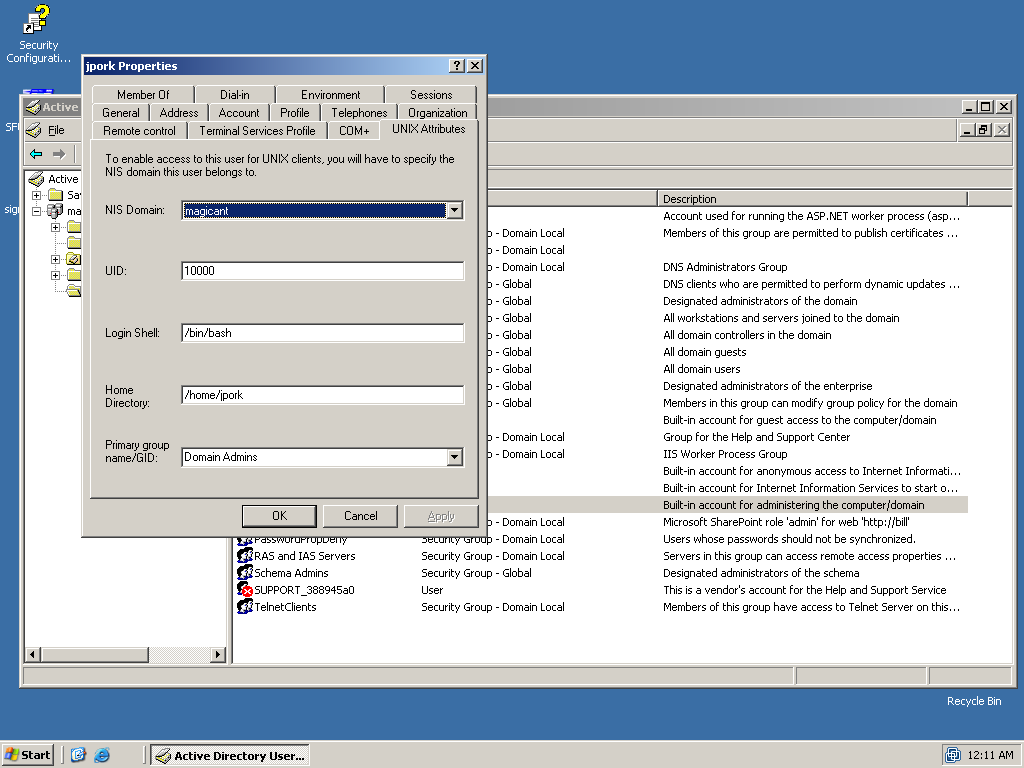
adding unix attributes
to a user account
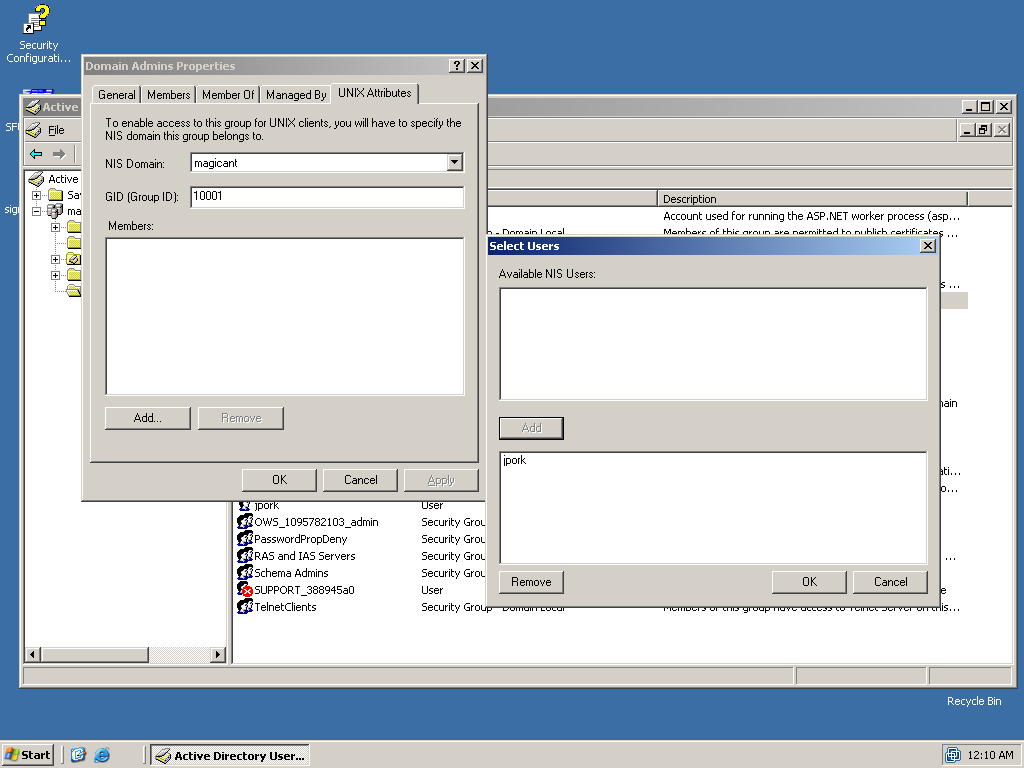
adding unix attributes
to an AD group
Assign UID/GID to AD entities
On reboot, I discover that there are now extra tabs in the user panels in the properties dialog of user/group objects in the AD User/Group MMC! At this point, I’ve just got one user, jpork, in AD. I first made the two domain groups “Domain Users” and “Domain Admins” all unixy going into their preference panels and assigning them ⚠ GIDs in the Unix Properties pane. I then assigned a UID to jpork, and then added jpork to both unixy groups.
Turn off SMB signing
Apparently this makes things confusing for linux machines. In both “Domain Security Policy” and “Domain Controller Security Policy”, I’ve disabled all “Digitally sign communications…” options in the “Security Options” section of Local Policies. To push this w/o rebooting twice, I issued (at the command line, in Windows no less) gpudate /force /boot.
enabling ldap browsing
Now we must create a user that can browse the LDAP tree. I’ve created the user “pparker” with the weak password “ldapbrowse”. The user has no special privileges, has UID/GID 499, shell /bin/false, and home /dev/null.
Linux Unified Login
openntpd
As kerberos is picky about the times set on both the KDC and the local machine, the first thing to do is going to be setting up openntpd to keep everything on the level, as far as the clocks go.
Kerberos
I’ve entered the following into /etc/kdc.conf:
[libdefaults]
       default_realm = MAGICANT.RC
       ticket_lifetime = 0
       clockskew = 300

[realms]
       OPENAD.LOCAL = {
       kdc = 10.22.1.50
       kdc = 10.22.1.50:88
       admin_server = 10.22.1.50:749
       }

[domain_realm]
       .openad.local = MAGICANT.RC
       openad.local = MAGICANT.RC
This should make it so I can properly get tickets for my domain.
LDAP, TLS, SSL, and SASL
The next step is to get ldap queries of the domain working properly. I’ve put the following into /etc/openldap/ldap.conf:
URI     ldaps://10.22.1.50
BASE    dc=magicant,dc=rc

TLS_CACERT     /etc/ssl/certs/adcert.pem
TLS_REQCERT     never
/etc/ssl/certs/adcert.pem was retrieved from the certificate service located at http://10.22.1.50/certsrv/ and converted to .pem format.
We should now be able to issue a few queries, and find that we are indeed able to.
To get SASL working (i.e. please no plaintext kthx), I had to add a line to /etc/hosts establishing 10.22.1.50 as “giygas”, the name of the KDC/PDC.
Name Service Switch
Hey, look, things are getting hairy now!
/etc/ldap.conf is configured as follows:
## server jazz
##############
uri             ldaps://giygas.magicant.rc
base            cn=users,dc=magicant,dc=rc


### security
use_sasl        on
sasl            start_tls
tls_checkpeer   no
tls_cacertfile  /etc/ssl/certs/adcert.pem
sasl_secprops   maxssf=0


scope           sub
timelimit       30


## user skazz
#############

# pam attrs
pam_login_attribute     sAMAccountName
pam_filter              objectclass=User
pam_password            ad
pam_member_attribute    msSFU30PosixMember
pam_groupdn             cn=Domain Users,dc=magicant,dc=rc

# nss stuffs
nss_base_passwd         cn=users,dc=magicant,dc=rc?sub
nss_base_shadow         cn=users,dc=magicant,dc=rc?sub
nss_base_group          cn=users,dc=magicant,dc=rc?sub

nss_map_objectclass     posixAccount User
nss_map_objectclass     shadowAccount User
nss_map_objectclass     posixGroup Group

nss_map_attribute       uid sAMAccountName
nss_map_attribute       uidNumber msSFU30UidNumber
nss_map_attribute       gidNumber msSFU30GidNumber
nss_map_attribute       homeDirectory msSFU30HomeDirectory
nss_map_attribute       loginShell msSFU30LoginShell

nss_map_attribute       cn sAMAccountName
#nss_map_attribute      cn cn
#nss_map_attribute      uniqueMember msSFU30PosixMember
nss_map_attribute       uniqueMember member

nss_map_attribute       gecos name
#nss_map_attribute      gecos cn
What this is for is to tell nss_ldap where to get its data. The first part says get it from giygas, use SSL and SASL to encrypt all your transmissions. The last part maps the wacky MS AD schema onto a normal LDAP schema.
Next step is to edit /etc/nsswitch.conf and tell nss to look to LDAP after local files.
NFS
NFS is the first thing to go up. I’ve made a directory off the root called /storage, set permissions to 777, and added it to /etc/exports with bill(rw,sync). Once SFU is up on bill, we should be able to mount this and drop files in at will.
This works. This is very cool.
Creating a PKI
Now that this is done, it’s time to shore up security. First thing to do is to make sure encryption is used when talking to the LDAP server. To do this, we’ll want to make a Public Key Infrastructure.